
How to catch a video while played in Firefox under Windows
If you use Firefox in Windows, you can catch video files (which are not directly downloadable) while they are being played. After starting the playing in your browser, use your file manager (if you have nothing better, you at least will have Windows’ Explorer) and go to
C:\Documents and Settings\[your name]\Local Settings\Application Data\Mozilla\Firefox\Profiles\....default\Cache
If your Windows is installed in another partition than C:, use the corresponding drive letter. If the location isn’t found under your name, it will most probably be found under “All Users” instead.
In Windows’ Explorer you can also use the “Address” toolbar and simply enter %appdata% and hit Enter. Then go to Mozilla\Firefox\Profiles\….default\Cache.
In Windows 98 and ME go to C:\WINDOWS\Application Data\Mozilla\Firefox\Profiles\....default\Cache. In Linux: ~/.mozilla/firefox.
If you use another Firefox profile than “default”, you must, of course, go to the actual profile instead. If you have no alternative profile, the entry “....default” may be missing, and then it continues directly: ...\Profiles\Cache.
Set your file manager to show the newest file first (sorting by date) and to show “Details” (not “List”). Mark the folder “Cache”. Then you can actualize the indicated sizes of the files by hitting F5 on your keyboard. You will see one of the first files steadily growing (the size indicated may change periodically by itself, or you see the new size when you hit F5). This is the file you want. Follow the download line on the video display in Firefox. The end of the line will be ahead of the actual point played. When that line reaches the end, copy the (now no more growing) file to another location, because it may soon disappear from the “Cache” folder.
This file has a cryptic alphanumeric name that in no way relates to the video’s name or subject. Change the name of the file by adding “.flv” (with the dot!) at the end (and you may want to change the cryptic code, too, to reflect the subject of the video). Now you have the video as a *.flv file.
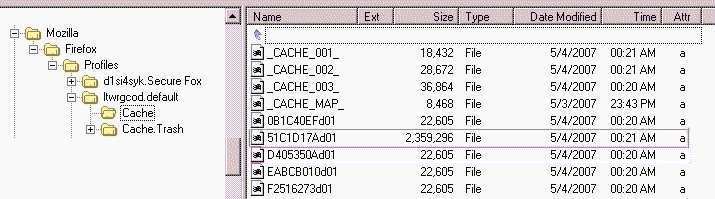
Copy (in this case) 51C1D17Ad01 to another location and change the name to 51C1D17Ad01.flv, or maybe SomethingElse.flv.
With Opera, find the file in:
C:\Documents and
Settings\[your name]\Local Settings\Opera\Opera\profile\cache4
and with the Internet Explorer try
...\Temporary Internet Files\ContentIE5 and one of the
subfolders.
If the source file has a Windows' media file format, use the WM Recorder to catch it while playing. Version 8.0 can still be found in the Internet and is freeware. Later versions have to be paid for.